


Mac-first companies keep inheriting a secure web gateway that was built for Windows and ported to macOS as a courtesy. Cisco Umbrella is the most visible example. It does the DNS-layer job it was designed for, but the macOS experience feels bolted on, Apple Silicon support lagged, and DNS-only filtering leaves the encrypted path mostly opaque.
If your fleet is 80 to 100 percent Mac, you are paying for a platform whose roadmap is not built around you. This post covers what breaks on Mac, what a Mac-first team actually needs from a secure web gateway, and how to migrate off a DNS-centric product without creating a coverage gap.
A Cisco Umbrella alternative for Mac-first companies should be native on Apple Silicon, deploy cleanly through Jamf or Intune, and inspect traffic with full URL and TLS visibility rather than resolving names in the blind.
Where DNS-Layer Filtering Falls Short
DNS filtering works by intercepting name resolution and returning a sinkhole for known-bad domains. It is fast, cheap, and easy to deploy. It is also blind to everything that happens after the name resolves.
The Encrypted Path Problem
Once a DNS query returns an IP and the client opens a TLS session, the DNS-only gateway has no further signal. Path-specific malicious URLs on a shared CDN look identical to benign ones. Uploads to a sanctioned service look identical to uploads to a shadow tenant of that service. DNS cannot tell the difference.
Category Drift on Newly Launched Services
New GenAI tools, personal storage apps, and SaaS entrants appear weekly. Category lists behind DNS products take days to weeks to catch up. In that window, employees are already moving data through tools that your policy does not know exist.
macOS as an Afterthought
DNS agents on macOS historically shipped with Rosetta binaries, fan-spinning CPU overhead, and installer flows that assume Windows admin patterns. First-class Apple Silicon support, signed kernel extensions replaced with system extensions, and Jamf-native deployment are table stakes on a Mac fleet and still uneven on legacy SWGs.
What Mac-First IT Teams Actually Need
A Mac-majority environment has its own pattern of requirements. Any replacement gateway should hit every one of them without a special services engagement.
Apple Silicon Native, Not Ported
The agent binary should be native ARM64 on M-series silicon. That means no Rosetta tax, no degraded battery life, and no mystery CPU spikes that drive users to uninstall.
Full URL and TLS Inspection
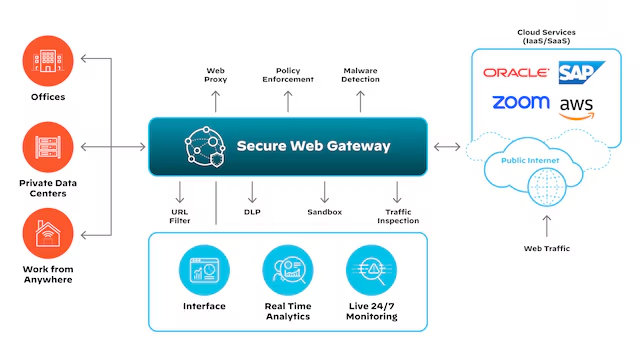
A modern secure web gateway should do on-device SSL inspection so you see the full URL and payload, not just the domain. No data center stopover, no proxy hop that adds latency on chatty SaaS apps.
Jamf and Intune Deployment Without Custom Wrappers
The install should ship as a signed PKG with an MDM profile bundle that Jamf or Intune pushes in one step. No pre-install scripts, no post-install reboots, no permission prompts that the end user has to click through.
Low Footprint and Native Protocol Support
Under 100 MB of RAM, native HTTP/2, and no downgrade to HTTP/1.1 just because the agent cannot parse the newer protocol. If the agent forces downgrades, user-facing apps get slower and users will find ways around the tool.
Shadow AI and GenAI Awareness
DNS lists update slowly. An endpoint-first swg sees the actual destinations at TLS handshake time and can block or coach on GenAI uploads even when the tool launched last week.
DNS-Only vs Full SWG Visibility
Use this table during vendor evaluation on a Mac fleet.
| Capability | DNS-Only SWG | Full On-Device SWG |
|---|---|---|
| Visibility | Domain name at resolution time | Full URL, path, headers, payload |
| Encrypted path | Blind after TLS handshake | Inspected on-device, no proxy hop |
| macOS support | Ported, often Rosetta | Native Apple Silicon binary |
| Shadow AI handling | Category list, days to update | Seen at first TLS handshake |
| Deployment | Windows-first MSI, macOS secondary | Signed PKG, Jamf and Intune native |
DNS filtering is not wrong, it is incomplete. On a Mac fleet, the missing context is where most of the risk lives.
Migration Path From a DNS-Centric SWG
Moving off Umbrella without a gap is a weekend of preparation and a two-week rollout, not a quarter of planning.
Week One: Inventory and Pilot
Pull the last 30 days of DNS logs and categorize the top 500 domains by business function. Identify the 20 to 50 destinations where full URL visibility would have changed a decision. Deploy the new agent to a 20-user pilot group through Jamf in monitor-only mode.
Week Two: Policy Parity
Translate Umbrella category rules into the new product. Most categories map one to one. The exceptions are GenAI and personal storage, which the new tool likely handles at a finer grain than DNS ever could.
Week Three: Cutover
Flip enforcement on for the pilot, then expand to the full fleet over three days. Keep the Umbrella agent installed in passive mode for one week as a safety net, then uninstall through MDM.
FAQ
What is better than Zscaler?
Better depends on fleet shape. For Mac-majority companies, an on-device SWG that runs native on Apple Silicon and inspects TLS locally beats a cloud proxy on latency, privacy, and deployment simplicity. Zscaler is strong on global presence; endpoint-first products are stronger on Mac experience and shadow AI discovery.
What does URL filtering do?
URL filtering inspects the full destination of a web request, including the path and query string, and allows or blocks based on category, reputation, or custom policy. It is the layer above DNS filtering, and it catches the cases where the domain is benign but a specific path is not. A tool like dope.security does this on-device so you get URL-level visibility without a proxy hop.
Why is DNS-only filtering not enough in 2026?
Because most traffic is encrypted and most new risk sits inside encrypted sessions on shared infrastructure. DNS cannot see which tenant of a SaaS app the user is touching, which path on a CDN is serving malware, or which GenAI tool is receiving pasted source code. Full URL and TLS inspection is the minimum bar.
How do I deploy a new SWG on Jamf?
Upload the signed PKG to Jamf, attach the vendor-provided configuration profile, and scope the policy to a test smart group. Modern agents require no pre-install script and no reboot. Expand the smart group once the pilot looks clean.