


Choosing the right remote desktop licensing arrangement can make a significant difference when running applications, managing servers, or providing secure remote access through a Windows-based virtual environment. For businesses and individuals using a virtual private server, understanding Windows VPS RDS CAL requirements is an important part of planning a reliable and compliant setup.
A Windows VPS can provide dedicated virtualized resources, administrative control, and convenient remote access. However, when multiple users or devices need to connect through Remote Desktop Services (RDS), licensing considerations become essential. The right approach depends on how the server will be used, how many people require access, and whether connections are made by users or specific devices.
Understanding Windows VPS RDS CAL
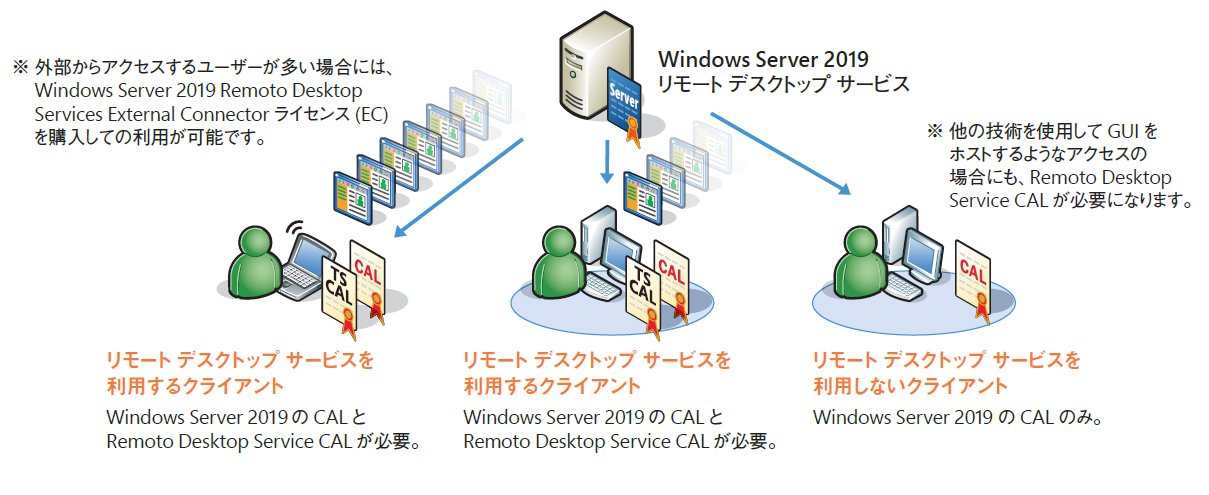
A Remote Desktop Services Client Access License, commonly called an RDS CAL, is a Microsoft licensing requirement associated with accessing certain Windows Server Remote Desktop Services functionality. It is separate from the operating system license running on the VPS.
The term Windows VPS RDS CAL therefore combines two important elements: the virtual server environment and the licensing needed for eligible Remote Desktop Services access. A VPS provider may include some licensing costs in a service package, while other providers may require customers to obtain or manage specific licenses separately.
Before purchasing a solution, it is important to understand exactly what the provider includes. A low-cost VPS does not automatically mean that every type of remote desktop access is covered.
Why RDS Licensing Matters
Remote desktop connections are useful because they allow authorized users to work with a Windows environment from different computers and locations. Businesses can use this capability for administration, application access, development, accounting, customer support, and other workflows.
As the number of users increases, licensing becomes more important. An organization should know how many people will connect and how those connections will be managed. Proper planning can help prevent unexpected licensing issues and make budgeting easier.
RDS CALs are generally associated with either users or devices, depending on the licensing model. Selecting the appropriate model requires understanding the way employees, contractors, or other authorized users interact with the VPS.
User CAL and Device CAL Considerations
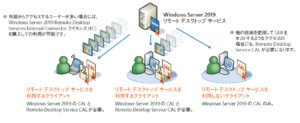
One of the key decisions involves choosing between User CAL and Device CAL licensing. A User CAL is generally assigned to a specific user who can access the applicable Remote Desktop Services environment from multiple devices.
This arrangement can be practical when one employee works from an office computer, laptop, home computer, or other authorized device. The licensing approach focuses on the person rather than every device that person uses.
A Device CAL, on the other hand, is associated with a particular device. This can be useful when multiple employees share the same workstation or terminal. Instead of licensing each individual user, an organization can license the devices that are used to connect.
The better fit depends on the company’s working pattern. Businesses with employees using several devices may find a user-based model more aligned with their environment, while shared-workstation environments may have different requirements.
Assess the Number of Remote Users
Before selecting Windows VPS RDS CAL arrangements, create a realistic estimate of how many people will require remote access. Do not simply count the number of employees in the organization.
For example, a company might have twenty employees but only eight people who need access to applications hosted on the VPS. In another organization, several employees may share workstations, which could influence the appropriate licensing model.
Consider both current and expected future usage. If the business plans to add employees or contractors, choosing a scalable VPS and licensing strategy can simplify future expansion.
Check the Windows Server Version
Compatibility is another important consideration. Windows Server versions have specific licensing and feature requirements, and RDS licensing should be aligned with the server environment being used.
Before purchasing an RDS CAL, verify the Windows Server version installed on the VPS and review the applicable Microsoft licensing requirements. Do not assume that a license designed for one environment automatically provides the rights needed for another.
Your VPS provider should be able to identify the Windows Server edition and explain which licensing components are included with the service.
Review What the VPS Provider Includes
Different hosting companies structure their Windows VPS packages differently. Some may include Windows licensing in the monthly VPS price, while RDS-related licensing may be handled separately.
Read the service description carefully and ask specific questions before ordering. Determine whether the advertised price includes the Windows operating system license, remote desktop access, RDS licensing, or only the underlying virtual server.
It is also useful to ask whether the provider manages license activation and whether customers are responsible for maintaining compliance. Clear answers can prevent misunderstandings after the VPS has been deployed.
Consider Performance Requirements
Licensing is only one part of choosing a suitable Windows VPS. Performance should also match the applications and number of remote sessions.
CPU cores, RAM, storage performance, and network connectivity can affect the remote desktop experience. A server used by several people simultaneously may require substantially more resources than a VPS used by a single administrator.
For basic administrative tasks, modest resources may be sufficient. More demanding applications, databases, development environments, and business software may require additional CPU and memory.
Think About Security
Remote desktop access should be protected with a strong security strategy. A VPS exposed directly to the internet can become a target for automated login attempts and other attacks.
Use strong passwords and unique credentials, keep Windows Server updated, limit administrative access, and apply appropriate firewall rules. Where practical, organizations should also consider additional authentication controls and network restrictions.
Only authorized users should receive access. Licensing compliance and security are separate responsibilities, so having an appropriate RDS CAL does not replace the need for secure server administration.
Evaluate Scalability and Future Growth
A good Windows VPS RDS CAL strategy should accommodate changes in the organization. Businesses often add employees, introduce remote work policies, or expand application usage over time.
Consider whether the hosting provider allows easy VPS upgrades and whether additional licensing can be added as the number of users or devices grows. A flexible environment can reduce the need for disruptive migrations later.
It is also useful to document who has access to the server and which licensing model is being used. Maintaining accurate records makes future reviews much easier.
Understand Licensing Responsibilities
Microsoft licensing can depend on the Windows Server version, deployment structure, access method, and licensing agreement. Because licensing requirements can change and specific situations can have additional conditions, organizations should verify their setup against current Microsoft licensing documentation or obtain advice from an appropriately qualified licensing professional.
A VPS provider can explain its own service terms, but customers should not assume that hosting support constitutes independent legal or licensing advice.
Making the Right Choice
Choosing Windows VPS RDS CAL requirements begins with understanding how the server will actually be used. Identify the number of users and devices, determine the Windows Server version, review the provider’s included licenses, and select the appropriate licensing model based on the organization’s access pattern.
At the same time, consider VPS performance, security, scalability, and support. The goal is not simply to purchase the cheapest remote desktop environment but to create a setup that supports daily operations while maintaining appropriate licensing and security practices.
Final Thoughts
A Windows VPS can provide a flexible environment for remote work, administration, and business applications, but Remote Desktop Services introduces additional licensing considerations. Understanding Windows VPS RDS CAL requirements before deployment helps organizations plan costs, users, devices, and server resources more effectively.
By carefully reviewing the licensing model, Windows Server version, provider terms, performance requirements, and security controls, users can build a more predictable remote access environment. When licensing details are uncertain, checking current Microsoft documentation or consulting a qualified licensing specialist is the safest way to confirm that the planned configuration meets the applicable requirements.